Photo booth booking software

Photo booth booking software that knows which booth is where.

Crema is a photo booth CRM for the selling and scheduling side of the business: hourly quotes with props, prints and backdrops, your booth photos and clips on the quote, checkout through Square, and a record of which booth and attendant go to each event.

The short answer

What does photo booth business software do in Crema?

It books the booth, not only the client. Every booth is its own equipment record, so assigning one unit to two events with overlapping hours raises a warning the moment you make the second assignment. Around that, Crema runs the inquiry, the hourly quote and add-ons, the deposit, the client’s backdrop and layout choices, and the attendant schedule.

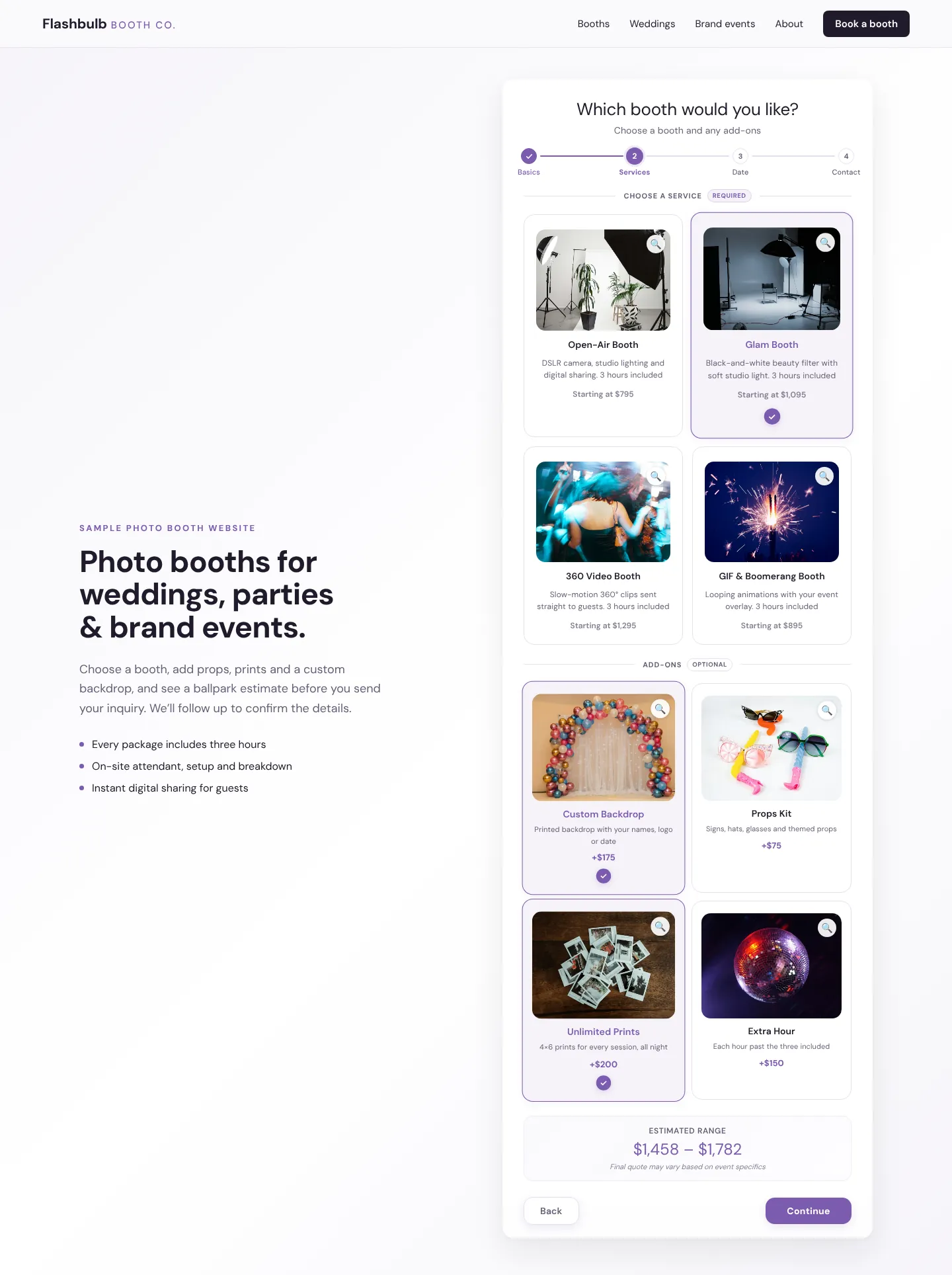
Sample photo booth inquiry form on a fictional booth company’s website, on the booths step: four booth packages with three hours included and four add-ons, each card topped with the photo the company uploaded, with Glam Booth, Custom Backdrop and Unlimited Prints selected and an estimated range above the Continue button.
A Crema inquiry form, embedded on a fictional photo booth company’s site. Each booth and add-on shows the photo the company uploaded for it, and the estimate adds the fourth hour; booths, prices and photos are illustrative.

Built for event work

Built for booth rentals, not just contact lists

Booth work turns on three questions: which unit is free, what the client chose, and who is running it. These tools keep all three answers on the event.

Each booth tracked as its own unit

Add every booth, printer and backdrop stand as a separate record with a name, asset tag or serial, status and condition. A booth marked for repair leaves the assignable list, and service dates show when a unit is due for maintenance. Reusing a booth that is already out during overlapping hours opens a Time collision warning, and a gap shorter than your turnaround buffer gets a warning of its own.

Hourly packages, extra hours and add-ons

Price a booth package by the hour, or as a flat package with included hours and an extra-hour rate that adds an Additional Hours line when the party runs late. Props, extra print sets, premium backdrops and a guestbook sit in the catalog as add-ons, each with photos that appear on its card in your inquiry form, charged flat, by the hour, or once per day on multi-day events.

Show the booth before they book

Attach photos, a PDF brochure or short video clips of your booth in action to the published quote, pre-selected by event type so a wedding quote shows wedding setups. Clients open photos and clips in a full-screen viewer, and one quote page can hold several package options.

See how Crema presents quotes

Upgrades offered as the client books

Turn on Enhance your package and choose the add-ons to offer under the price, such as a second backdrop or a scrapbook album. Anything already on the quote is left out. A pick updates the total, the deposit and the card charge through Square.

Backdrop and layout choices, with uploads

A questionnaire on the booking confirmation asks which backdrop the client wants, the names and date for the print layout, and has an upload slot for a logo or monogram. Backdrop questions can be set to appear only for clients who booked a backdrop add-on. Crema collects the choices and files; your team designs the layout.

An attendant for every booth

Give each event an attendant target, send availability requests by email, and pick the attendant from the event’s Staff panel. Crema warns when one attendant lands on two events whose times clash, and each reminder email lists the booked add-ons and your setup run sheet.

See event staff scheduling

A repeatable process

Two booths, one busy Saturday

An illustrative example: you own Booth A and Booth B, and two Saturday events overlap, a wedding from 6 to 10pm and a company party from 7 to 10pm.

  1. Book

    The wedding client accepts a package with three included hours, so the quote carries one extra hour, picks a sequin backdrop from Enhance your package, and pays the deposit. The company party accepts its own quote a week later.

  2. Assign

    You put Booth A on the wedding. On the company party, choosing Booth A again opens a Time collision warning because the windows overlap, so you assign Booth B. The inquiry form checks dates and times, not booths, so once the wedding is confirmed it refuses an overlapping request for that evening; you add the company party yourself as a new lead.

  3. Staff

    Each event needs one attendant. You assign Jordan to the wedding and Priya to the party; putting Jordan on both would have raised a staff conflict for the same overlapping hours.

  4. Prepare

    The couple uses the confirmation-page questionnaire to confirm the backdrop and upload a monogram, and the company uploads its logo. Your team builds both print layouts from those files, and each attendant’s reminder email lists the booked add-ons and the setup run sheet.

Straight answers

Photo booth software questions

Can Crema stop two events from booking the same booth?

It warns rather than blocks. Assigning a booth that is out during overlapping hours always shows a Time collision warning, which cannot be switched off, while a turnaround shorter than your buffer shows a separate warning you can mute. The inquiry form judges availability by date and time rather than by booth, so a request that overlaps a confirmed event is refused there; overlapping bookings for a second booth go in as leads you add yourself.

Can clients pick a backdrop or upload a logo online?

Yes. Build a questionnaire from multiple-choice, text and image-upload questions and pick the event types it is for. The client meets it on the confirmation page after booking, and optional email reminders follow if it is left unfinished.

Can I take a deposit and collect the rest later?

Yes, with Square connected. The client pays the deposit at booking and Crema charges the saved card for the balance on the event date. Events booked inside your full-payment window, 48 hours by default, are paid in full, and Apple Pay or Google Pay appear only on a pay-in-full checkout.

Do attendants need a Crema login?

No. Attendants reply to availability requests through signed email links or a personal shift-board link, and reminders arrive by email. A manager makes every assignment.

What does Crema not do for photo booth businesses?

Crema does not run the booth software, capture or deliver guest photos, host online event galleries or sharing stations, or design print templates and overlays. It handles the business around the booth: inquiries, quotes, Square payments, equipment, attendants and client questionnaires. The gallery on a Crema quote shows your own marketing photos and clips, not photos from the event.